
Luca Calarailli has spent years at the intersection of construction, design, and the technologies that make complex facilities run safely. He approaches workplace communication like an architect designs a building: as a system where materials, structure, and human experience must align. In environments where milliseconds and seconds matter, he focuses on purpose-built devices, unified architectures, and the invisible layer of orchestration that keeps people and machines in sync. Our conversation explores how to move beyond fragmented tools toward resilient, zero-latency experiences on the production floor—without a rip-and-replace.
Many facilities juggle three or four tools that don’t talk to each other. How does this fragmentation specifically erode safety and trust on the floor, and what system-level architecture would you implement first? Please share a real incident and the measurable before/after impact.
Fragmentation creates what I call organized chaos: three or four tools, each competent on its own, but collectively unreliable when one system doesn’t connect to another. I’ve seen a shift where a line lead had to repeat instructions three times because voice lived in one app, messaging in another, and an XML workflow was marooned elsewhere; seconds slipped away while a palletizer and people stood in limbo. The fix started with a single architecture that treats devices as nodes in a system—voice, messaging, and integrated XML applications operating together over Wi‑Fi 6E, with the network designed to self-correct so a worker gets the instruction once. After that move, repeat rates dropped from three times to once, and the floor stopped “listening for the tool” and returned to listening for the work; that regained trust was palpable in calmer handoffs and fewer escalations at shift change.
Frontline workers often rely on personal phones when enterprise tools fall short. What signals would you monitor to catch this early, and what are the step-by-step actions to migrate them back to managed devices? Include adoption metrics and a timeline that actually works.
The earliest signal is behavioral: if people reach for personal phones, your enterprise stack has failed them. I watch for constant drops in network data and the same IT tickets appearing week after week, then validate on the floor—are workers fumbling with a device or repeating steps? Over 90 days, I run a three-phase path: weeks 1‑4 to stabilize Wi‑Fi 6E coverage and onboard purpose-built devices; weeks 5‑8 to consolidate voice, messaging, and XML workflows into one architecture; weeks 9‑13 to retire legacy pathways that trained people to bypass the system. Adoption is visible when those repeated instructions shrink from three times to once and personal phone usage fades to the background; the experience should feel invisible, which is how you know you’ve truly won them back.
In high-noise environments where PPE blocks audio cues, how do you design for clarity without turning up volume? Walk through the signal chain—mics, codecs, AI noise removal, speakers—and share performance metrics (e.g., word error rate, instruction repeat rates) from real deployments.
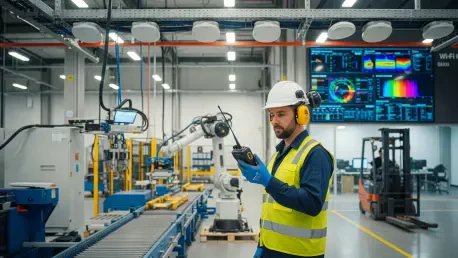
I start with near-field mics placed to favor the mouth and reject the din that PPE tends to trap; that way you feed the pipeline a clean signal. Next comes a codec that preserves consonant edges, then AI that eliminates background noise before it reaches the listener—so clarity rises without louder speakers battling the floor. On the device side, I match speakers to the human voice band so directions don’t smear into ambient hum. The metric I trust most is operational: workers no longer repeating instructions three times but hearing it once, even when seconds matter—when that pattern persists across shifts, you know the signal chain is doing its job.
Where milliseconds matter around people and robotics, how do Wi‑Fi 6E and Wi‑Fi 7 change reliability on crowded floors? Describe your RF planning playbook, target latency/jitter thresholds, and a time you used spectrum analytics to resolve collisions or interference.
Wi‑Fi 6E and Wi‑Fi 7 open space where crowded legacy bands used to collide, giving you a synchronized environment for time-sensitive tasks. My RF playbook maps movement flows first—robots, forklifts, and people—then layers 6E coverage so devices can stay anchored without tripping over each other, especially at handoff points where milliseconds become seconds if mismanaged. During one commissioning, spectrum analytics showed collisions spiking near a shared path; moving critical voice to 6E and isolating nonessential chatter restored that once-and-done clarity on instructions. I judge success by the sensation of smoothness—no audible stutter, no repeated prompts—because when the network self-corrects, micro-hiccups never surface as user-visible pain.
You’ve advocated “zero-latency” communication, but networks aren’t perfect. What self-correcting mechanisms at the network layer actually prevent user-visible issues, and how do you verify them in staging? Offer a step-by-step validation checklist and the telemetry you trust most.
Zero-latency is the design North Star, and self-correcting networks make it feel real even when conditions shift. I rely on continuous visibility—think ThousandEyes-style agents that can detect degradation before a worker senses it—combined with prioritization so voice and safety signals win when contention rises. My staging checklist is simple: confirm device onboarding into one architecture; induce controlled interference; verify the call lands once without repeats; walk a route through known RF stressors with PPE on; and check that post-call telemetry shows no constant drops or repeated tickets re-surfacing. The telemetry I trust is pattern-based: if calls resolve on the first try and instructions are heard once instead of three times under stress, the self-correction is working.
Facilities carry heavy legacy debt. How do you modernize without rip‑and‑replace? Outline a phased migration path that protects uptime—pilot scope, gateway layers, security controls, rollback triggers—and include the change-management tactics that kept frontline teams engaged.
Legacy debt often spans years or even decades, so asking for a clean slate is a nonstarter. I begin with a pilot on a single line and a shift change window, introduce a gateway layer that lets old and new talk, and add security controls aligned to one architecture so new devices don’t create fresh vulnerabilities. Rollback is simple and visible—one switch returns the line to the prior state if behavior or safety signals misfire. I keep teams engaged by letting them feel the difference: not louder gadgets, but instructions arriving once; that visceral shift builds confidence more than any slide deck ever could.
Security anxiety rises with every new device. What end-to-end model—identity, segmentation, over-the-air protection, observability—keeps risk down while staying usable? Share a breach-prevention example, the controls that mattered most, and how you measured residual risk.
I frame security as a single, unified experience: one architecture for identity, tight segmentation so critical voice and XML apps aren’t exposed, over‑the‑air protection inherent to the platform, and continuous visibility that spots drift before it becomes danger. In one case, adding purpose-built wireless phones alongside radios triggered anxiety; by anchoring them to the same identity backbone and segment, and watching for constant drops or anomalous tickets, we prevented gaps that attackers love. The control that mattered most wasn’t just a feature—it was seeing behavior calm down as workers stopped juggling three or four disjointed tools. Residual risk dropped when we observed fewer workarounds and instructions landing once, even under PPE and noise, because people who trust the system don’t create new attack paths.
Dedicated action buttons and integrated XML apps sound simple but change workflows. Which on-device actions drive the biggest time savings, and how do you decide what earns a hardware button versus software tile? Include quantitative outcomes from shift-change or escalation use cases.
The biggest wins are the actions that rescue seconds during shift changes and escalations: a single hardware press for priority voice, and an XML checklist that loads the exact task, not a menu maze. I reserve hardware buttons for moves that must work once, under gloves and stress, while software tiles handle the longer paths. On one floor, a hardware button cut the old pattern of repeating an urgent call three times down to once; you could hear the difference in the room’s tempo. When the end-of-shift XML flow pulls live status in one touch, the handoff stops leaking seconds, and that calm is as measurable as any chart.
If a “working” strategy feels invisible, how do you objectively prove it? Describe the KPIs that matter—mean time to reach, call setup success, handoff failure rate—and the thresholds you consider green. Tell a story where ThousandEyes-style visibility prevented a floor outage.
The paradox is real: when it works, it disappears. I track mean time to reach a supervisor, call setup success on the first attempt, and handoff failure rate during roaming; green is when frontline staff hear instructions once and never think about the device. During a maintenance window, ThousandEyes-style visibility flagged rising degradation before the crew felt it; we shifted traffic onto Wi‑Fi 6E paths and the “outage” never reached the floor. Afterwards, you could sense the relief—no frantic second or third tries, just a single, clear instruction and steady breathing behind the PPE.
Many teams mix consumer phones, radios, and third-party tools. What interoperability layers or gateways have actually succeeded at scale, and where do they fail? Share a concrete integration diagram, plus the two vendor-agnostic standards you insist on from day one.
The mixes I inherit often include consumer phones, radios, and an XML app that lives alone; success comes when a gateway can pull them into one architecture without asking for a rip‑and‑replace. I sketch it like this: radios and legacy devices into a gateway; gateway into voice, messaging, and XML apps; all of it over Wi‑Fi 6E with the network self-correcting beneath. It fails when teams keep adding yet another tool, turning three or four into five, because the human brain gives up and reaches for a personal phone. From day one, I insist that XML applications integrate natively and that the wireless layer is ready for Wi‑Fi 6E or Wi‑Fi 7 so we aren’t locked out of that synchronized environment later.
For deployment in factories, warehouses, and hospitals, how do you tailor RF design, device durability, and cleaning protocols? Walk through the environmental tests, enclosure ratings, and the maintenance schedule you recommend, including stories of what failed and why.
I tune RF where people actually move—forklift aisles, bed transfers, staging bays—because dead zones during handoff are where seconds get lost. Devices must endure hard wipes and gloved handling without making workers fumble; when we used consumer gear, repeated cleaning dulled the mics and forced people to repeat directions three times. I now test with PPE on, in real noise, then validate that instructions land once across the whole route. Maintenance rides the shift cadence: touchpoints at shift change so the floor stays calm and the tool remains invisible.
Sustainability and repairability are now buying criteria. How do you design for long life—battery cycles, spare parts logistics, modular components—without bloating cost or weight? Provide TCO math over five years and a case where repairability averted large-scale replacement.
Sustainability starts with longevity and repairability designed in, not bolted on; devices that go obsolete in two years create cost, waste, and disruption. Over five years, a repairable device avoids the churn of buying and retraining twice; more importantly, it preserves the muscle memory that lets directions land once instead of triggering three attempts as people relearn new buttons. We dodged a mass replacement when modular parts brought a fleet back from the brink after harsh cleaning; minutes after the swap, the line was quiet again, instructions crisp under PPE. That quiet is your TCO working in the background.
AI-driven noise suppression can alter voice characteristics. How do you prevent operator miscommunication or loss of urgency cues? Describe tuning methods, human factors testing, and the feedback loop that refined your models, with examples of fixes that moved the needle.
AI must remove noise without sanding off the human edge—the urgency and grain that say “move now.” We tune to preserve those cues, then run human factors tests with PPE so we don’t train a model in silence and deploy it into a storm. Early on, operators had to repeat urgent calls three times; after refining to cut only the background and leave the voice intact, those calls landed once, and you could feel shoulders unclench. The loop never ends: we watch for constant drops in certain bays, gather feedback at shift change, and adjust so the system stays invisible even as conditions evolve.
What’s your blueprint for training frontline teams so they don’t fumble devices under pressure? Detail the curriculum, drills, and job aids, plus the metrics (proficiency scores, first-call completion) that show readiness. Share an anecdote where training prevented a safety incident.
Training mirrors the work: short drills in real noise with PPE on, a single hardware press for priority calls, and XML flows mapped to the exact job—not a generic list. Job aids live on the device, and the exam is simple: can you get an instruction out once, cleanly, without thinking? In one drill, a new hire started to repeat a call three times; coaching on button placement and pacing turned it into a single, clear transmission, which later prevented a near‑miss when a robot paused inches from a pallet. Readiness shows up as calm at shift change and first‑call completion that feels routine.
If you had to re-architect a plant’s communications in 90 days, what would your sprint plan look like? Break down week-by-week milestones, must-have integrations, risk checkpoints, and the minimal viable improvements that still deliver measurable safety and throughput gains.
In 90 days, I’d run three sprints. Weeks 1‑4: map flows, stabilize Wi‑Fi 6E, onboard purpose-built devices, and stand up a gateway so radios and consumer phones can live inside one architecture. Weeks 5‑8: fuse voice, messaging, and XML; harden security; validate that workers get instructions once on the noisiest routes with PPE on. Weeks 9‑13: retire redundant tools so “three or four” becomes one path, monitor ThousandEyes‑style health, and lock in the habit where seconds are saved at shift change because nobody repeats a thing.
What is your forecast for workplace communication technology?
The future disappears into the work. Wi‑Fi 6E and Wi‑Fi 7 will make synchronized environments normal, and self‑correcting networks will spot degradation before people feel it, so the instruction arrives once even when seconds matter. Devices built for longevity and repairability will outlast two‑year churn, easing legacy debt that took years—sometimes decades—to build. My forecast is simple: the best systems will be the ones nobody notices—until the day they’re gone and the room suddenly gets loud with second and third attempts.