
The persistent disconnect between the precision of architectural drafting and the artistic demands of high-end visualization has long forced designers into a fragmented and often frustrating cycle of exports and re-imports. Architects frequently find themselves caught in a technical vacuum where the structural integrity of a Building Information Modeling (BIM) project feels entirely separate from the emotional resonance of a final render. Redshift for Archviz enters this space as a stabilizing force, specifically engineered to bridge the gap between Vectorworks 2026 and the production-grade rendering power of Maxon’s GPU-accelerated engine. By embedding the renderer directly into the design interface, the software eliminates the traditional “export-and-pray” methodology that has historically slowed down project timelines. This integration allows for a fluid transition from technical line work to photorealistic imagery without ever leaving the primary workspace, ensuring that the visual narrative of a building evolves alongside its physical constraints.
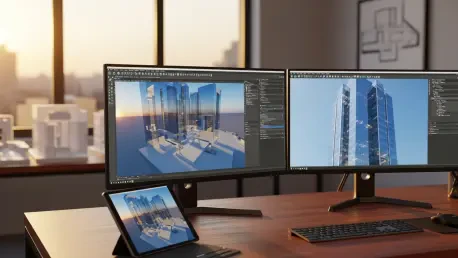
This unified environment fundamentally changes how look development occurs during the early stages of a project, where rapid changes are the most frequent and costly. Instead of waiting for a separate visualization team to return with processed images, the lead designer can now verify lighting, materiality, and spatial volume in real time. The immediate feedback loop provided by the GPU-accelerated preview allows for more courageous design choices, as the consequences of changing a facade material or shifting a structural column are visible instantly in a high-fidelity window. This shift from a linear workflow to a circular, iterative process means that the final presentation is no longer a distant goal but a continuous byproduct of the design phase. By maintaining visual consistency from the first conceptual massing to the final client meeting, the platform provides a level of predictability that reduces the risk of miscommunication between the architect, the developer, and the end-user.
1. Achieving Photorealistic Precision Through Integrated Lighting and Environments
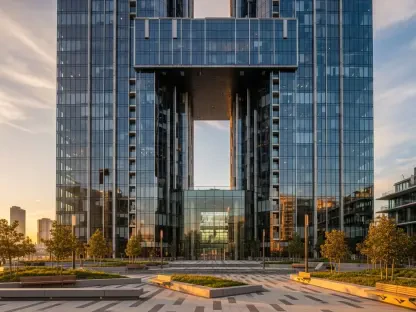
The foundation of any compelling architectural visualization lies in how light interacts with the built environment, a task that Redshift for Archviz handles through a physically accurate global illumination system. Designers can manipulate the sun’s position and the time of day with intuitive sliders, watching as long shadows stretch across a plaza or as golden hour light pours through a clerestory window. This is not merely an aesthetic exercise; it serves as a critical diagnostic tool for understanding solar gain and natural light penetration within a BIM model. The software calculates these complex light bounces on the GPU, providing a responsive experience that allows for the fine-tuning of shadow softness and light intensity. Because the system is built on the same core technology used in major motion pictures, the resulting images possess a level of depth and realism that standard BIM viewers simply cannot replicate, turning a technical model into a persuasive marketing asset.
Beyond the basic sun and sky parameters, the toolset provides granular control over atmospheric conditions, which are essential for establishing the specific mood of a project. The cloud cover settings are particularly sophisticated, allowing users to transition seamlessly from a crisp, clear morning to a moody, overcast afternoon. These adjustments directly impact how natural light is filtered and diffused, changing the contrast and color temperature of the entire scene in an instant. Such atmospheric flexibility is vital for presenting a building across different seasonal or weather contexts, helping clients visualize the structure in its true geographic reality. By integrating these environmental controls directly into the Vectorworks interface, the workflow avoids the need for external post-processing or lighting adjustments in a separate application. This ensures that the environmental data remains tethered to the BIM geometry, providing a singular source of truth for both the technical and the visual aspects of the architectural proposal.
2. Streamlining Scene Composition With Extensive Material and Asset Libraries
Building an inhabited, believable world around a structural model often takes more time than drafting the building itself, which is why the inclusion of specialized content libraries is a significant workflow upgrade. Redshift for Archviz provides a curated selection of high-quality assets, including furniture, vehicles, realistic vegetation, and human figures, all designed to be dragged and dropped directly into the scene. These assets are pre-optimized for the rendering engine, meaning they carry the necessary complexity to look realistic in a close-up without dragging down the performance of the BIM software. By populating a workspace with these ready-to-use elements, designers can quickly provide a sense of scale and purpose to an empty lobby or a barren streetscape. This immediate “set dressing” capability allows architects to focus on the spatial experience rather than the tedious task of hunting for compatible 3D models or troubleshooting textures that fail to render correctly.
Materiality is the second pillar of this streamlined composition process, offering a wide array of physically correct surfaces that behave naturally under any lighting condition. Whether it is the subtle reflection on a brushed metal panel, the transparency of high-performance glass, or the tactile grain of timber, these materials react accurately to the environment and the light sources around them. The library spans the entire spectrum of architectural finishes, from raw concrete to delicate textiles, ensuring that every surface in the BIM model can be assigned a professional-grade look development profile. Because these materials are applied and previewed in real time, the process of selecting finishes becomes a dynamic part of the design conversation. If a specific wood grain feels too dark in a shaded corner, it can be swapped or adjusted instantly, allowing the designer to curate the interior and exterior palettes with total confidence in the final rendered output.
3. Optimizing the Pipeline Through Cross-Platform Parity and Advanced Animation
The modern architectural studio is rarely a mono-platform environment, making the full feature parity between Windows and macOS a critical logistical advantage for diverse teams. Maxon has ensured that the rendering experience is identical across both operating systems, allowing a designer on a Mac laptop to collaborate seamlessly with a colleague using a high-powered Windows workstation. This consistency prevents the technical friction that often arises when specific shaders or lighting effects behave differently on different hardware architectures. Furthermore, the software is built to scale with the available hardware, supporting multi-GPU configurations that can significantly reduce render times for high-resolution stills or complex sequences. This cross-platform reliability ensures that the production pipeline remains stable regardless of the individual hardware choices of the staff or the specific infrastructure of the studio, making it a versatile choice for global firms.
When a project demands more than a static image, the “one-click” bridge to Cinema 4D transforms the BIM model into a foundation for high-end cinematic storytelling. This connection allows for the seamless transfer of geometry, cameras, and lights, enabling specialists to implement procedural animations, advanced simulations, and intricate camera choreography that go far beyond basic walkthroughs. For instance, a designer can export a completed Vectorworks model to Cinema 4D to simulate a crowded transit hub with moving people and vehicles or to create a time-lapse showing the building’s construction process. Because the materials and lighting settings are preserved during the transfer, the visual identity established in the BIM phase remains intact. This bridge effectively creates a tiered workflow where the BIM tool remains the hub for design and documentation, while the animation suite provides the professional-grade tools necessary for creating award-winning architectural films and immersive experiences.
4. Step-by-Step: Implementing the Redshift Workflow Within the BIM Environment
Successfully integrating this rendering power into a professional office requires a systematic approach to installation and workspace configuration to ensure maximum stability. The process begins with the host software environment, where the user must ensure that Vectorworks 2026 is installed using the default settings to maintain compatibility with the plugin architecture. Following the primary installation, the user must navigate to the Maxon App, which serves as the central management hub for all licensing and software updates. After logging in, the next critical step is to deploy the AEC Viewer through the management interface, which provides the necessary underlying technology for the real-time link to function. This structured approach ensures that all background services are correctly initialized before the user attempts to trigger a render, minimizing the likelihood of driver conflicts or licensing errors during the middle of a project deadline.
Once the underlying software components are in place, the user must activate the toolset within the specific host application to make it accessible during the design process. This involves modifying the workspace and navigating to the rendering category to add the Redshift plugin entry to the primary interface menus. To initialize the real-time connection between the drafting engine and the renderer, the user clicks the “Auto Synch” toggle, which creates a live bridge that updates the render view as changes are made to the 3D geometry. It is also mandatory to verify the subscription status and accept the End User License Agreement (EULA) within the MyMaxon account to unlock the full potential of the GPU acceleration. For high-demand environments, the system supports up to eight GPUs on a single machine, allowing studios to scale their local rendering power to meet the needs of increasingly complex architectural scenes and large-scale urban developments.
5. Advancing Professional Standards Through Real-Time Visual Feedback Loops
The adoption of Redshift for Archviz represents a shift toward a more transparent and communicative architectural practice, where the technical and the visual are no longer treated as separate disciplines. Professionals who integrate these tools into their daily routine are finding that the ability to provide instant, high-fidelity visual feedback drastically reduces the number of revisions required during the client approval process. When a client can see the realistic impact of a material change or a window placement in real time, the decision-making process becomes more decisive and less prone to second-guessing. This efficiency not only saves time but also allows the architect to maintain greater control over the creative vision of the project, as the visuals are always rooted in the actual BIM data. The result is a professional output that is both technically rigorous and aesthetically compelling, raising the standard for what is expected in modern architectural presentations.
Looking ahead, the logical progression for firms is to move beyond static visualization and begin utilizing the real-time link for internal design charrettes and collaborative sessions. By using the renderer as a live mirror of the design process, teams can catch spatial conflicts or lighting issues that might be missed in a standard wireframe or shaded view. Studios should consider establishing a standardized material library and asset template based on the Redshift ecosystem to ensure a consistent visual brand across all project teams. As the software expands to support other BIM platforms like Revit and Archicad in the near future, the opportunity for multi-disciplinary firms to unify their visualization standards will only increase. Embracing these integrated workflows now prepares a practice for a future where the boundary between the digital model and the physical reality continues to blur, ultimately leading to better-built environments and more successful project deliveries.